

Measure. Plan. Prepare a quote.
DroneViewer for Tradespeople and Trades
Taking Measurements on a Model
Your construction site starts in the browser
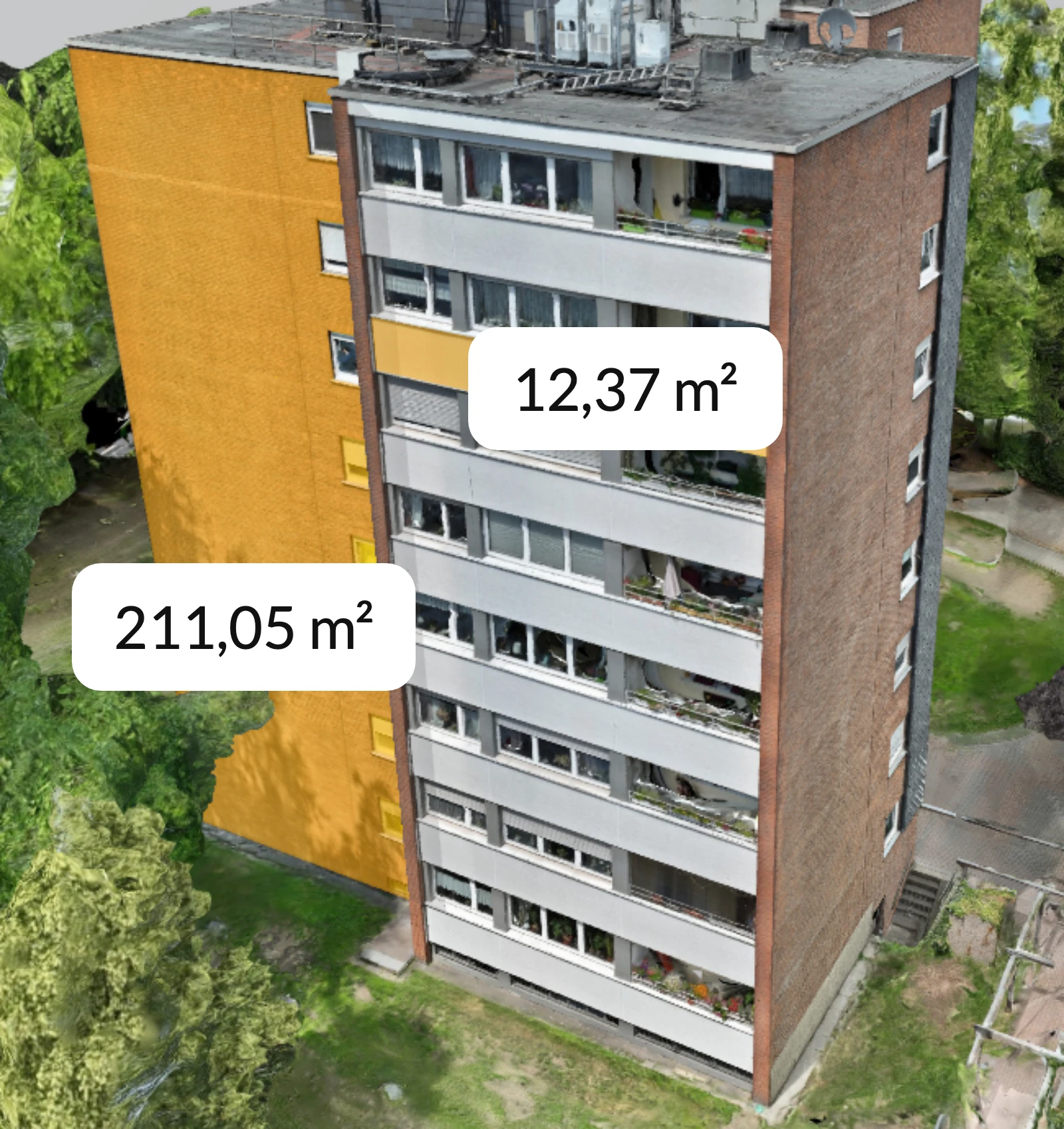
Whether it's roof area, facade, or window dimensions—with DroneViewer, you can measure building components quickly and accurately. Ideal for preparing quotes, planning work, or documenting damage—whether you're in the office or on the go.
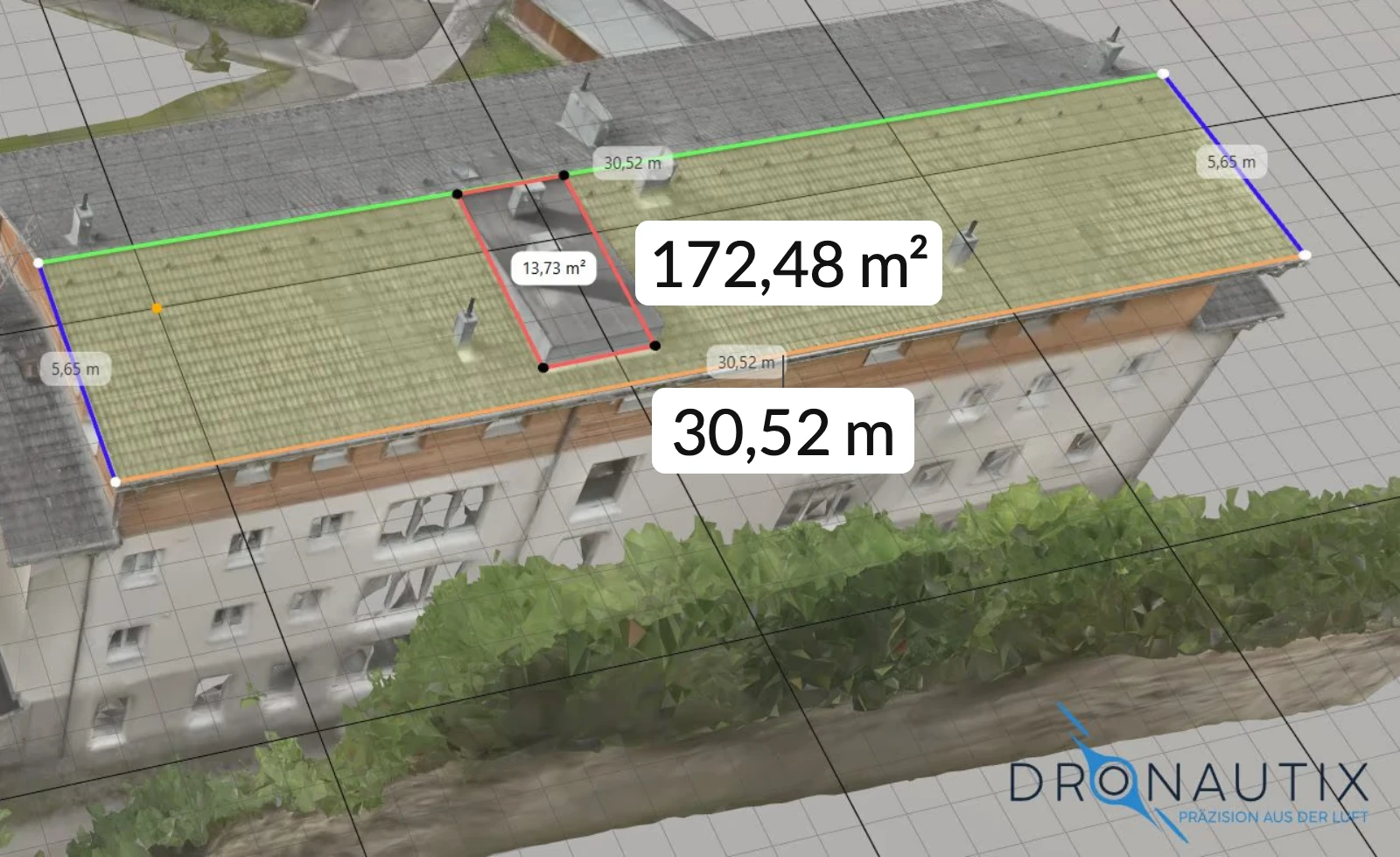
Dormers, skylights, and roof valleys make taking measurements by hand a slow and challenging process. In DroneViewer, you can create a working plane on the surface with just a few clicks. All measurements are then recorded on this plane, even across projections and curves.
Your Benefits
Your Benefits at a Glance
- Precise Area and Slope Calculations
- Volume & Corridor Areas at the Touch of a Button
- Work Planning Based on Real 3D Data
- PDF Versions for Requests for Proposals & Bids
- Comment Features for Project Partners & Clients
From Measurement to Quote
The area is measured; the quote follows
The areas in the model are used to determine material requirements and line items for your quote. You can either forward the folder to the client or incorporate the values into your cost estimate. There is no longer a need for a second meeting between the measurement and the quote.
Measurements by component, not just by total area
In the viewer, you assign tags to individual areas, such as the eaves, the ridge, or a dormer. The report then lists these areas separately by tag, rather than providing just a total for the entire roof. Using this breakdown, you can calculate each item individually and prepare the quote without needing a second site visit.
Less effort, more time for craftsmanship
DroneViewer reduces follow-up inquiries, cuts down on trips to the construction site, and ensures smooth communication with clients and construction managers.
Use Cases
Typical Use Cases
Site Survey Before the Quote
Roof and facade areas are calculated using a model before you quote a price. This means the quote is based on a figure you can back up. Anyone who gets multiple quotes can compare them based on the same area.
Preparation with colleagues and subcontractors
Everyone involved sees the same model in the browser, with no installation required. You can clarify questions about measurements and cuts in person rather than over the phone.
Documentation of Condition and Damage
You can mark damage and construction status directly on the model, along with a photo and the date. The record remains on the object and can still be found even months later.
Installation Planning for Solar Panels, Scaffolding, and Windows
Plan module layouts, scaffolding configurations, and window dimensions on the working plane. Any issues that don’t fit will be noticed before delivery, not on the construction site.
Before the First Project
Three Questions Every Business Asks First
How accurate are the measurements?
Accuracy depends on the source data. The better the aerial survey and scan, the better the measurement. Typically, the deviation is in the range of a few centimeters. For a fixed-price quote, this means you know the tolerance before you do the calculations.
Do I need my own drone?
No. You can fly the drone yourself or hire a service provider. DroneViewer works with the data generated during the flight.
Even if you don’t have your own drone, our partner DRONAUTIX will fly for you in Germany and Austria. They provide aerial surveys, 3D models, and condition assessments, all tailored to the needs of small businesses. You’ll receive the data ready to view in the viewer.
DRONAUTIX Flight Service →Will these values be included in my calculation?
You can export area measurements, material requirements, and item lines as PDF, CSV, or DXF files and import them into your cost estimate. DroneViewer does not replace your planning and cost estimation software. It simply provides the values you use in your calculations. The viewer runs in a browser—no installation or plugins required—and can even be accessed by the client.
Flight Partners
Do you fly yourself? Become a flight partner.
We connect pilots with partners in the region. Let us know where you're traveling, and we'll contact you as soon as a job comes up in your area. This provides you with an additional source of income alongside your own jobs.
Solar & Photovoltaics
The future is on the roof.
DroneViewer for Solar Installers & PV Projects
Accurate Data for Perfect Planning
Plan photovoltaic systems using actual geodata instead of estimates. DroneViewer provides precise roof slopes, area measurements, and shading information directly from the drone model.
Sun Position and Shading, Down to the Day
Enter the sun's position and angle of incidence for a date of your choice. You'll see which part of the roof surface is in the shade at that time and where the modules will generate power. You can draw rafters, structures, and obstacles directly onto the model.
Your Benefits in Solar Projects
- Calculating PV Suitability: Orientation, Shading
- Area Calculation Despite Dormers, Skylights, or Obstacles
- Exportable data for planning tools and requests for proposals
- Commenting on and Highlighting Module Fields
- Linking Mission Data (Objects, Addresses, Weather, Season)
How It Works
From a Roof Scan to a Quote
DroneViewer does not replace your workflow—it fills the gap between your existing tools. Before DroneViewer, the model is created in photogrammetry software such as Agisoft Metashape. After DroneViewer, design software such as PV*SOL takes over. In between, you can measure and coordinate in the browser, even with stakeholders who do not have these programs installed.
-
Scan and Working Plane
The 3D model is generated from the drone scan. You upload it and align the working plane with the roof surface.
-
Usable Roof Area
The viewer immediately shows how much space is available for modules, taking into account dormers, skylights, and shading.
-
Output
Export the mounting areas and material requirements as a PDF, CSV, or DXF file for system design and your quote.
Next Step
We'll show you how the Viewer works using a roof from your practice
Free and with no obligation. A 15- to 30-minute consultation with a suitable expert. Response within 24 hours.